
Stop guessing.
Start progressing.
For experienced gym-goers who already own the floor. No beginner tutorials, no filler — just 328 elite, science-backed protocols across twelve disciplines (categories), living on your device and ready with zero signal. Less a library, more the gym companion that runs your session.
This is what your subscription unlocks
The below program is a real sample, verbatim from the vault feed — now with its full coaching layer (smart rests, session plan, progression, swaps), a LOG button on every row, and muscle heat per day. The four live phones below show it exactly as it renders in the app.
| Exercise | Sets | Reps | Rest |
|---|
Double progression: when every set hits the top of its rep range, add 2.5–5 lb next session.
Failure sets: stop 1 rep shy of true failure — add a rep each week, then add weight and restart the climb.
Starred (*) sets are intensity sets: reach near-failure, cut ~20% and keep going.
Stuck on a lift? Hold the weight one extra session before adding — form first.
Every workout coaches you through the session
Open any of the 328 protocols and the app lays out the whole session — progression rules, rest on every exercise, tap-to-check sets with an auto rest timer, and a plan with time + equipment. No pen, no stopwatch, no guessing. The sample table above is live — tap any set circle to run its rest timer.
Log the set. The app remembers everything.
Every exercise row carries a LOG button. Weight, reps and RPE go on-device in one tap — the app tracks strength per lift, calls out PRs, and files every session into a calendar, graphs and volume totals. Try the working miniature below: log a set and watch the graph move.
Miniature of the real logger — the app adds a session clock, plate steppers, copy-last, ‹ › exercise nav, PR flash and fully editable history.
The whole vault, gym-floor ready
One phone. 328 protocols. Offline in a basement gym with zero bars — chalk on, signal off, and a companion that times every rest and calls every progression.

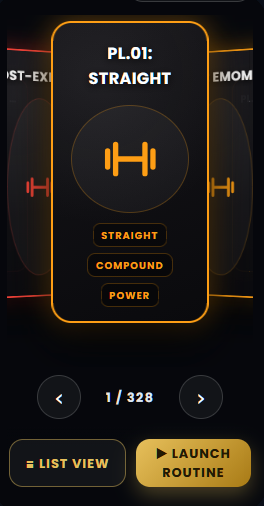
Your entire program library on the device in your pocket. Open the Matrix between sets, launch the routine, train — no signal, no loading wheels.
Stop renting motivation
Random PDFs stall after six weeks. Bloated apps nag you. Coaches cost hundreds a month. One vault, five bucks, on your device.
| WorkoutsLab · $5/mo | Typical fitness app | In-person PT | |
|---|---|---|---|
| Advanced protocols, all included | 328 | Dozens, tiers paywalled | One coach's playbook |
| Fully offline on the gym floor | ✓ | Partial | — |
| Set logging + training history | ✓ | Partial | — |
| No app store, no storage bloat | ✓ | 100–300 MB + forced updates | — |
| Cancel in one click, no calls | ✓ | Varies | Sessions prepaid |
| Monthly cost | $5 | ~$13–40 | $200+ |
Four screens. Zero surprises.
Live views straight from the app — not painted mockups. The first three are frozen; the last phone is live — scroll it.
Add WorkoutsLab in seconds
No App Store required. WorkoutsLab is a high-performance web app — zero storage bloat, updates automatically, and launches full-screen right from your home grid.
 WorkoutsLab
Built for the gym floor
One plan. Everything.
- All 328 protocols, all 12 disciplines
- Progression cards, smart rests, set checkoffs + rest timer in every workout
- Session plans with time + equipment, swap options included
- Offline mode after first activation — updates sync automatically whenever you're online
- Favorites shelf inside the app
- Every future protocol included
Quick answers
Who is this for?
Experienced, self-sufficient lifters. If you know your form and master your execution, you don't need a video guide — you need advanced programming. Absolute beginners should learn the basics first, then come back.
Any video guides or beginner tutorials?
None — and that's the point. Zero fluff, zero beginner tutorials: pure training architecture for lifters who already know how to move iron. Every protocol dives straight into professional-grade programming across 300+ advanced protocols.
How many days a week?
Protocols run 2–6 days to match your schedule — each lists its days up front.
How do progression and rest timers work?
Every workout opens with a progression card (when to add weight, what to do on failure or stalls) and rest on each exercise. Tap each set done and a floating pill counts down the rest — with sound and vibration — then tells you to lift.
Can I save favorites?
One tap on the star. Your shelf stays on-device, private, always.
Does it track my lifts and progress?
Yes — tap LOG on any set (weight, reps, RPE) and the app keeps an on-device training log: a calendar of sessions, per-lift strength graphs, a PR list and volume totals. Past sessions stay editable, and each workout shows its own history with sparklines. No account, nothing leaves your phone.
Do I need internet at the gym?
No. Activate once with a connection and the whole vault lives on your device.
Is this on the Apple App Store or Google Play Store?
No — no App Store required. WorkoutsLab is a high-performance web app: zero storage bloat, updates automatically, and launches full-screen right from your home grid. Setup takes seconds:
1. Launch. Open the app link and enter the license key sent to your e-mail (a backup QR code is included in the same e-mail).
2. Add to your home screen. iPhone: tap the Share icon at the bottom of the screen, scroll down and tap Add to Home Screen (if you don't see it, tap More → Add to Home Screen), then tap Add in the top-right corner. Android: tap the three-dots menu in the top-right corner of Chrome, tap Add to Home Screen (or Install app), and confirm by tapping Add.
3. Done. The WorkoutsLab badge sits on your phone alongside your daily apps — ready for instant, one-tap access on the gym floor.
Does this work on multiple devices or if I change phones?
Yes. Your activation code unlocks access across your phone, tablet, and desktop. If you upgrade your phone, simply visit the app URL and re-enter your activation key.
Can I cancel my subscription anytime?
Absolutely. You have 24/7 self-service control over your subscription through Lemonsqueezy, our authorized Merchant of Record. Simply click "Manage Subscription" in your monthly email receipt to pause or cancel with a single click—no emails or support calls needed. You will maintain full platform access through the end of your current $5 billing cycle.
What is the refund policy?
Because WorkoutsLab grants immediate offline access to our complete protocol vault upon activation, all sales are final. However, you can manage or cancel your $5/month subscription at any time with a single click.
Questions? Talk to a human.
Write us and we'll get back to you as quick as humanly possible. Subscription stuff (receipts, pause, cancel) is instant and self-service through the monthly e-mail you get (if you're a subscriber) from our authorized merchant re-seller, Lemon Squeezy.